ZhangYang's Blog

Redux

前言

React 只是 DOM 的一个抽象层,并不是 Web 应用的完整解决方案。有两个方面,它没涉及

  • 代码结构
  • 组件之间的通信

不使用 Redux 或者其他状态管理工具,不按照一定规律处理状态的读写,代码很快就会变成一团乱麻

需要一种机制,可以在同一个地方查询状态、改变状态、传播状态的变化

设计思想

  • Web 应用是一个状态机,视图与状态是一一对应的。
  • 所有的状态,保存在一个对象里面

基本概念和 API

Store

Store 就是保存数据的地方,整个应用只能有一个 Store

Redux 提供createStore这个函数,用来生成 Store

1
2
3
// createStore函数接受另一个函数作为参数,返回新生成的 Store 对象
import { createStore } from 'redux';
const store = createStore(fn);

State

想得到某个时点的数据,就要对 Store 生成快照。这种时点的数据集合,就叫做 State

当前时刻的 State,可以通过store.getState()拿到

Redux 规定, 一个 State 对应一个 View。只要 State 相同,View 就相同

1
2
3
4
import { createStore } from 'redux';
const store = createStore(fn);
const state = store.getState();

Action

State 的变化,会导致 View 的变化。用户接触不到 State,只能接触到 View

State 的变化必须是 View 导致的。Action 就是 View 发出的通知,表示 State 应该要发生变化

Action 是一个对象。其中的type属性是必须的,表示 Action 的名称

1
2
3
4
5
// Action 的名称是ADD_TODO,它携带的信息是字符串Learn Redux
const action = {
type: 'ADD_TODO',
payload: 'Learn Redux'
};

Action 描述当前发生的事情。改变 State 的唯一办法,就是使用 Action。它会运送数据到 Store

Action Creator

View 要发送多少种消息,就会有多少种 Action。可以定义一个函数来生成 Action,这个函数就叫 Action Creator

1
2
3
4
5
6
7
8
9
10
11
// addTodo函数就是一个 Action Creator
const ADD_TODO = '添加 TODO';
function addTodo(text) {
return {
type: ADD_TODO,
text
}
}
const action = addTodo('Learn Redux');

store.dispatch()

store.dispatch()是 View 发出 Action 的唯一方法

1
2
3
4
5
6
7
8
9
10
11
// store.dispatch接受一个 Action 对象作为参数,将它发送出去
import { createStore } from 'redux';
const store = createStore(fn);
store.dispatch({
type: 'ADD_TODO',
payload: 'Learn Redux'
});
// 结合 Action Creator,这段代码可以改写
store.dispatch(addTodo('Learn Redux'));

Reducer

Store 收到 Action 以后,必须给出一个新的 State,这样 View 才会发生变化。这种 State 的计算过程就叫做 Reducer

Reducer 是一个函数,它接受 Action 和当前 State 作为参数,返回一个新的 State

1
2
3
4
const reducer = function (state, action) {
// ...
return new_state;
};

整个应用的初始状态,可以作为 State 的默认值

1
2
3
4
5
6
7
8
9
10
11
12
13
14
15
// reducer函数收到名为ADD的 Action 以后,就返回一个新的 State,作为加法的计算结果
const defaultState = 0;
const reducer = (state = defaultState, action) => {
switch (action.type) {
case 'ADD':
return state + action.payload;
default:
return state;
}
};
const state = reducer(1, {
type: 'ADD',
payload: 2
});

store.dispatch方法会触发 Reducer 的自动执行

Store 需要知道 Reducer 函数,做法就是在生成 Store 的时候,将 Reducer 传入createStore方法

1
2
3
4
// createStore接受 Reducer 作为参数,生成一个新的 Store
// 每当store.dispatch发送过来一个新的 Action,就会自动调用 Reducer,得到新的 State
import { createStore } from 'redux';
const store = createStore(reducer);

Action 对象按照顺序作为一个数组

1
2
3
4
5
6
7
8
9
// 数组actions表示依次有三个 Action,分别是加0、加1和加2
// 数组的reduce方法接受 Reducer 函数作为参数,就可以直接得到最终的状态3
const actions = [
{ type: 'ADD', payload: 0 },
{ type: 'ADD', payload: 1 },
{ type: 'ADD', payload: 2 }
];
const total = actions.reduce(reducer, 0); // 3

纯函数

Reducer 函数最重要的特征是,它是一个纯函数。也就是说,只要是同样的输入,必定得到同样的输出

Reducer 是纯函数,就可以保证同样的State,必定得到同样的 View

Reducer 函数里面不能改变 State,必须返回一个全新的对象

1
2
3
4
5
6
7
8
9
10
11
// State 是一个对象
function reducer(state, action) {
return Object.assign({}, state, { thingToChange });
// 或者
return { ...state, ...newState };
}
// State 是一个数组
function reducer(state, action) {
return [...state, newItem];
}

store.subscribe()

Store 允许使用store.subscribe方法设置监听函数,一旦 State 发生变化,就自动执行这个函数

1
2
3
4
5
// 把 View 的更新函数(对于 React 项目,就是组件的render方法或setState方法)放入listen,实现 View 的自动渲染
import { createStore } from 'redux';
const store = createStore(reducer);
store.subscribe(listener);

store.subscribe方法返回一个函数,调用这个函数就可以解除监听

1
2
3
4
5
let unsubscribe = store.subscribe(() =>
console.log(store.getState())
);
unsubscribe();

Store 的实现

Store 提供了三个方法

  • store.getState()
  • store.dispatch()
  • store.subscribe()
1
2
3
4
5
6
import { createStore } from 'redux';
let { subscribe, dispatch, getState } = createStore(reducer);
// createStore方法还可以接受第二个参数,表示 State 的最初状态。这通常是服务器给出的
// window.STATE_FROM_SERVER就是整个应用的状态初始值
let store = createStore(todoApp, window.STATE_FROM_SERVER)

createStore方法的一个简单实现,可以了解一下 Store 是怎么生成的

1
2
3
4
5
6
7
8
9
10
11
12
13
14
15
16
17
18
19
20
21
22
const createStore = (reducer) => {
let state;
let listeners = [];
const getState = () => state;
const dispatch = (action) => {
state = reducer(state, action);
listeners.forEach(listener => listener());
};
const subscribe = (listener) => {
listeners.push(listener);
return () => {
listeners = listeners.filter(l => l !== listener);
}
};
dispatch({});
return { getState, dispatch, subscribe };
};

Reducer 的拆分

Reducer 函数负责生成 State。由于整个应用只有一个 State 对象,包含所有数据

三种 Action 分别改变 State 的三个属性

  • ADD_CHAT:chatLog属性
  • CHANGE_STATUS:statusMessage属性
  • CHANGE_USERNAME:userName属性
1
2
3
4
5
6
7
8
9
10
11
12
13
14
15
16
17
18
const chatReducer = (state = defaultState, action = {}) => {
const { type, payload } = action;
switch (type) {
case ADD_CHAT:
return Object.assign({}, state, {
chatLog: state.chatLog.concat(payload)
});
case CHANGE_STATUS:
return Object.assign({}, state, {
statusMessage: payload
});
case CHANGE_USERNAME:
return Object.assign({}, state, {
userName: payload
});
default: return state;
}
};

Reducer 函数拆分。不同的函数负责处理不同属性,最终把它们合并成一个大的 Reducer 即可

1
2
3
4
5
6
7
8
// Reducer 函数被拆成了三个小函数,每一个负责生成对应的属性
const chatReducer = (state = defaultState, action = {}) => {
return {
chatLog: chatLog(state.chatLog, action),
statusMessage: statusMessage(state.statusMessage, action),
userName: userName(state.userName, action)
}
};

Redux 提供了一个combineReducers方法,用于 Reducer 的拆分

1
2
3
4
5
6
7
8
9
10
11
12
13
14
15
16
17
18
19
20
21
22
23
24
25
26
27
28
// 通过combineReducers方法将三个子 Reducer 合并成一个大的函数
import { combineReducers } from 'redux';
const chatReducer = combineReducers({
chatLog,
statusMessage,
userName
})
export default todoApp;
// 这种写法有一个前提,就是 State 的属性名必须与子 Reducer 同名。如果不同名,就要采用下面的写法
// combineReducers()做的就是产生一个整体的 Reducer 函数
// 该函数根据 State 的 key 去执行相应的子 Reducer,并将返回结果合并成一个大的 State 对象
const reducer = combineReducers({
a: doSomethingWithA,
b: processB,
c: c
})
// 等同于
function reducer(state = {}, action) {
return {
a: doSomethingWithA(state.a, action),
b: processB(state.b, action),
c: c(state.c, action)
}
}

combineReducer的简单实现

1
2
3
4
5
6
7
8
9
10
11
const combineReducers = reducers => {
return (state = {}, action) => {
return Object.keys(reducers).reduce(
(nextState, key) => {
nextState[key] = reducers[key](state[key], action);
return nextState;
},
{}
);
};
};

把所有子 Reducer 放在一个文件里面,然后统一引入

1
2
3
4
import { combineReducers } from 'redux'
import * as reducers from './reducers'
const reducer = combineReducers(reducers)

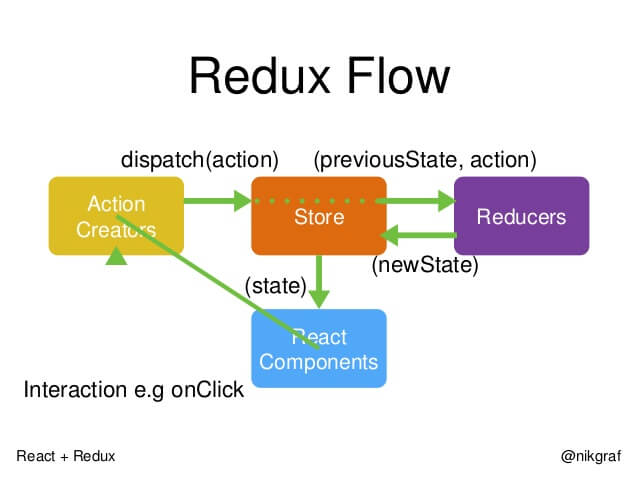
工作流程

image

1
2
3
4
5
6
7
8
9
10
11
12
13
14
15
// 首先,用户发出 Action
store.dispatch(action);
// 然后,Store 自动调用 Reducer,并且传入两个参数:当前 State 和收到的 Action。 Reducer 会返回新的 State
let nextState = todoApp(previousState, action);
// State 一旦有变化,Store 就会调用监听函数
// 设置监听函数
store.subscribe(listener);
// listener可以通过store.getState()得到当前状态。如果使用的是 React,这时可以触发重新渲染 View
function listerner() {
let newState = store.getState();
component.setState(newState);
}

计数器

1
2
3
4
5
6
7
8
9
10
11
12
13
14
15
// 计数器,作用就是把参数value的值,显示在网页上
// Store 的监听函数设置为render,每次 State 的变化都会导致网页重新渲染
const Counter = ({ value }) => (
<h1>{value}</h1>
);
const render = () => {
ReactDOM.render(
<Counter value={store.getState()}/>,
document.getElementById('root')
);
};
store.subscribe(render);
render();

为Counter添加递增和递减的 Action

1
2
3
4
5
6
7
8
9
10
11
12
13
14
15
16
17
18
19
20
21
22
23
24
25
26
27
28
29
30
31
const Counter = ({ value, onIncrement, onDecrement }) => (
<div>
<h1>{value}</h1>
<button onClick={onIncrement}>+</button>
<button onClick={onDecrement}>-</button>
</div>
);
const reducer = (state = 0, action) => {
switch (action.type) {
case 'INCREMENT': return state + 1;
case 'DECREMENT': return state - 1;
default: return state;
}
};
const store = createStore(reducer);
const render = () => {
ReactDOM.render(
<Counter
value={store.getState()}
onIncrement={() => store.dispatch({type: 'INCREMENT'})}
onDecrement={() => store.dispatch({type: 'DECREMENT'})}
/>,
document.getElementById('root')
);
};
render();
store.subscribe(render);

中间件的概念

Action 发出以后,Reducer 立即算出 State,这叫做同步;Action 发出以后,过一段时间再执行 Reducer,这就是异步

中间件就是一个函数,对store.dispatch方法进行了改造,在发出 Action 和执行 Reducer 这两步之间,添加了其他功能

发送 Action 的这个步骤,即store.dispatch()方法,可以添加功能

要添加日志功能,把 Action 和 State 打印出来,可以对store.dispatch进行如下改造

1
2
3
4
5
6
7
// 对store.dispatch进行了重定义,在发送 Action 前后添加了打印功能。这就是中间件的雏形
let next = store.dispatch;
store.dispatch = function dispatchAndLog(action) {
console.log('dispatching', action);
next(action);
console.log('next state', store.getState());
}

中间件的用法

redux-logger提供一个生成器createLogger,可以生成日志中间件logger

将它放在applyMiddleware方法之中,传入createStore方法,就完成了store.dispatch()的功能增强

1
2
3
4
5
6
7
8
import { applyMiddleware, createStore } from 'redux';
import createLogger from 'redux-logger';
const logger = createLogger();
const store = createStore(
reducer,
applyMiddleware(logger)
);

applyMiddleware方法的三个参数,就是三个中间件。有的中间件有次序要求,使用前要查一下文档

1
2
3
4
5
6
7
8
9
10
11
12
// createStore方法可以接受整个应用的初始状态作为参数,applyMiddleware是第三个参数
const store = createStore(
reducer,
initial_state,
applyMiddleware(logger)
);
// 中间件的次序有讲究
const store = createStore(
reducer,
applyMiddleware(thunk, promise, logger)
);

applyMiddlewares()

Redux 的原生方法,作用是将所有中间件组成一个数组,依次执行

1
2
3
4
5
6
7
8
9
10
11
12
13
14
15
16
17
18
// 所有中间件被放进了一个数组chain,然后嵌套执行,最后执行store.dispatch
// 中间件内部(middlewareAPI)可以拿到getState和dispatch这两个方法
export default function applyMiddleware(...middlewares) {
return (createStore) => (reducer, preloadedState, enhancer) => {
var store = createStore(reducer, preloadedState, enhancer);
var dispatch = store.dispatch;
var chain = [];
var middlewareAPI = {
getState: store.getState,
dispatch: (action) => dispatch(action)
};
chain = middlewares.map(middleware => middleware(middlewareAPI));
dispatch = compose(...chain)(store.dispatch);
return {...store, dispatch}
}
}

异步操作的基本思路

同步操作只要发出一种 Action 即可,异步操作的差别是它要发出三种 Action

  • 操作发起时的 Action
  • 操作成功时的 Action
  • 操作失败时的 Action

以向服务器取出数据为例,三种 Action 可以有两种不同的写法

1
2
3
4
5
6
7
8
9
// 写法一:名称相同,参数不同
{ type: 'FETCH_POSTS' }
{ type: 'FETCH_POSTS', status: 'error', error: 'Oops' }
{ type: 'FETCH_POSTS', status: 'success', response: { ... } }
// 写法二:名称不同
{ type: 'FETCH_POSTS_REQUEST' }
{ type: 'FETCH_POSTS_FAILURE', error: 'Oops' }
{ type: 'FETCH_POSTS_SUCCESS', response: { ... } }

除了 Action 种类不同,异步操作的 State 也要进行改造,反映不同的操作状态

1
2
3
4
5
6
7
8
// State 的属性isFetching表示是否在抓取数据
// didInvalidate表示数据是否过时,lastUpdated表示上一次更新时间
let state = {
// ...
isFetching: true,
didInvalidate: true,
lastUpdated: 'xxxxxxx'
};

整个异步操作的思路

  • 操作开始时,送出一个 Action,触发 State 更新为”正在操作”状态,View 重新渲染
  • 操作结束后,再送出一个 Action,触发 State 更新为”操作结束”状态,View 再一次重新渲染

redux-thunk 中间件

操作结束时,系统自动送出第二个 Action

1
2
3
4
5
6
7
8
9
// 加载成功后(componentDidMount方法),它送出了(dispatch方法)一个 Action,
// 向服务器要求数据 fetchPosts(selectedSubreddit)。这里的fetchPosts就是 Action Creator
class AsyncApp extends Component {
componentDidMount() {
const { dispatch, selectedPost } = this.props
dispatch(fetchPosts(selectedPost))
}
// ...

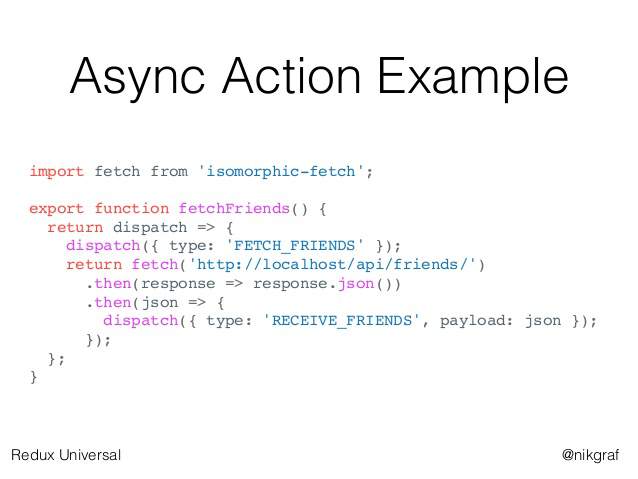
fetchPosts是一个Action Creator(动作生成器),返回一个函数

这个函数执行后,先发出一个Action(requestPosts(postTitle)),然后进行异步操作

拿到结果后,先将结果转成 JSON 格式,然后再发出一个 Action( receivePosts(postTitle, json))
image

1
2
3
4
5
6
7
8
9
10
11
12
13
14
15
16
17
18
// fetchPosts返回了一个函数,而普通的 Action Creator 默认返回一个对象
// 返回的函数的参数是dispatch和getState这两个 Redux 方法,普通的 Action Creator 的参数是 Action 的内容
// 在返回的函数之中,先发出一个 Action(requestPosts(postTitle)),表示操作开始
// 异步操作结束之后,再发出一个 Action(receivePosts(postTitle, json)),表示操作结束
const fetchPosts = postTitle => (dispatch, getState) => {
dispatch(requestPosts(postTitle));
return fetch(`/some/API/${postTitle}.json`)
.then(response => response.json())
.then(json => dispatch(receivePosts(postTitle, json)));
};
};
// 使用方法一
store.dispatch(fetchPosts('reactjs'));
// 使用方法二
store.dispatch(fetchPosts('reactjs')).then(() =>
console.log(store.getState())
);

Action 是由store.dispatch方法发送的。而store.dispatch方法正常情况下,参数只能是对象,不能是函数

这时,就要使用中间件redux-thunk

异步操作的第一种解决方案就是,写出一个返回函数的 Action Creator,然后使用redux-thunk中间件改造store.dispatch

1
2
3
4
5
6
7
8
9
10
// 使用redux-thunk中间件,改造store.dispatch,使得后者可以接受函数作为参数
import { createStore, applyMiddleware } from 'redux';
import thunk from 'redux-thunk';
import reducer from './reducers';
// Note: this API requires redux@>=3.1.0
const store = createStore(
reducer,
applyMiddleware(thunk)
);

redux-promise 中间件

Action Creator 可以返回函数,当然也可以返回其他值

让 Action Creator 返回一个 Promise 对象

使用redux-promise中间件

1
2
3
4
5
6
7
8
import { createStore, applyMiddleware } from 'redux';
import promiseMiddleware from 'redux-promise';
import reducer from './reducers';
const store = createStore(
reducer,
applyMiddleware(promiseMiddleware)
);

这个中间件使得store.dispatch方法可以接受 Promise 对象作为参数

1
2
3
4
5
6
7
8
9
10
11
12
13
14
15
16
17
18
19
20
21
22
23
24
25
26
27
28
// 写法一,返回值是一个 Promise 对象
const fetchPosts =
(dispatch, postTitle) => new Promise(function (resolve, reject) {
dispatch(requestPosts(postTitle));
return fetch(`/some/API/${postTitle}.json`)
.then(response => {
type: 'FETCH_POSTS',
payload: response.json()
});
});
// 写法二,Action 对象的payload属性是一个 Promise 对象。从redux-actions模块引入createAction方法
// 第二个dispatch方法发出的是异步 Action,只有等到操作结束,这个 Action 才会实际发出
// createAction的第二个参数必须是一个 Promise 对象
import { createAction } from 'redux-actions';
class AsyncApp extends Component {
componentDidMount() {
const { dispatch, selectedPost } = this.props
// 发出同步 Action
dispatch(requestPosts(selectedPost));
// 发出异步 Action
dispatch(createAction(
'FETCH_POSTS',
fetch(`/some/API/${postTitle}.json`)
.then(response => response.json())
));
}

redux-promise的源码

  • Action 本身是一个 Promise,它 resolve 以后的值应该是一个 Action 对象,会被dispatch方法送出(action.then(dispatch))
  • reject 以后不会有任何动作
  • Action 对象的payload属性是一个 Promise 对象,那么无论 resolve 和 reject,dispatch方法都会发出 Action
1
2
3
4
5
6
7
8
9
10
11
12
13
14
15
16
17
18
19
export default function promiseMiddleware({ dispatch }) {
return next => action => {
if (!isFSA(action)) {
return isPromise(action)
? action.then(dispatch)
: next(action);
}
return isPromise(action.payload)
? action.payload.then(
result => dispatch({ ...action, payload: result }),
error => {
dispatch({ ...action, payload: error, error: true });
return Promise.reject(error);
}
)
: next(action);
};
}

UI 组件

React-Redux 将所有组件分成两大类:UI 组件和容器组件

  • 只负责 UI 的呈现,不带有任何业务逻辑
  • 没有状态(即不使用this.state这个变量)
  • 所有数据都由参数(this.props)提供
  • 不使用任何 Redux 的 API
1
2
const Title =
value => <h1>{value}</h1>;

容器组件

React-Redux 规定,所有的 UI 组件都由用户提供,容器组件则是由 React-Redux 自动生成。也就是说,用户负责视觉层,状态管理则是全部交给它

  • 负责管理数据和业务逻辑,不负责 UI 的呈现
  • 带有内部状态
  • 使用 Redux 的 API

connect()

React-Redux 提供connect方法,用于从 UI 组件生成容器组件。connect的意思,就是将这两种组件连起来

1
2
3
4
5
6
7
8
9
// TodoList是 UI 组件,VisibleTodoList就是由 React-Redux 通过connect方法自动生成的容器组件
// connect方法接受两个参数:mapStateToProps和mapDispatchToProps
// 它们定义了 UI 组件的业务逻辑。前者负责输入逻辑,即将state映射到 UI 组件的参数(props),后者负责输出逻辑,即将用户对 UI 组件的操作映射成 Action
import { connect } from 'react-redux'
const VisibleTodoList = connect(
mapStateToProps,
mapDispatchToProps
)(TodoList)

mapStateToProps()

mapStateToProps是一个函数。作用就是建立一个从(外部的)state对象到(UI 组件的)props对象的映射关系

mapStateToProps执行后应该返回一个对象,里面的每一个键值对就是一个映射

1
2
3
4
5
6
7
// mapStateToProps是一个函数,它接受state作为参数,返回一个对象
// 这个对象有一个todos属性,代表 UI 组件的同名参数,后面的getVisibleTodos也是一个函数,可以从state算出 todos 的值
const mapStateToProps = (state) => {
return {
todos: getVisibleTodos(state.todos, state.visibilityFilter)
}
}

mapStateToProps会订阅 Store,每当state更新的时候,就会自动执行,重新计算 UI 组件的参数,从而触发 UI 组件的重新渲染

mapStateToProps的第一个参数总是state对象,还可以使用第二个参数,代表容器组件的props对象

1
2
3
4
5
6
7
8
9
10
11
12
13
14
// 使用ownProps作为参数后,如果容器组件的参数发生变化,也会引发 UI 组件重新渲染
// connect方法可以省略mapStateToProps参数,那样的话,UI 组件就不会订阅Store,就是说 Store 的更新不会引起 UI 组件的更新
const getVisibleTodos = (todos, filter) => {
switch (filter) {
case 'SHOW_ALL':
return todos
case 'SHOW_COMPLETED':
return todos.filter(t => t.completed)
case 'SHOW_ACTIVE':
return todos.filter(t => !t.completed)
default:
throw new Error('Unknown filter: ' + filter)
}
}

mapDispatchToProps()

mapDispatchToProps是connect函数的第二个参数,用来建立 UI 组件的参数到store.dispatch方法的映射

定义了哪些用户的操作应该当作 Action,传给 Store。它可以是一个函数,也可以是一个对象

mapDispatchToProps是一个函数,会得到dispatch和ownProps(容器组件的props对象)两个参数

1
2
3
4
5
6
7
8
9
10
11
12
13
14
15
16
17
18
19
20
21
22
// mapDispatchToProps作为函数,应该返回一个对象,该对象的每个键值对都是一个映射,定义了 UI 组件的参数怎样发出 Action
const mapDispatchToProps = (
dispatch,
ownProps
) => {
return {
onClick: () => {
dispatch({
type: 'SET_VISIBILITY_FILTER',
filter: ownProps.filter
});
}
};
}
// mapDispatchToProps是一个对象,它的每个键名也是对应 UI 组件的同名参数,键值应该是一个函数,会被当作 Action creator ,返回的 Action 会由 Redux 自动发出
const mapDispatchToProps = {
onClick: (filter) => {
type: 'SET_VISIBILITY_FILTER',
filter: filter
};
}

Provider 组件

connect方法生成容器组件以后,需要让容器组件拿到state对象,才能生成 UI 组件的参数

React-Redux 提供Provider组件,可以让容器组件拿到state

1
2
3
4
5
6
7
8
9
10
11
12
13
14
// Provider在根组件外面包了一层,这样一来,App的所有子组件就默认都可以拿到state了
import { Provider } from 'react-redux'
import { createStore } from 'redux'
import todoApp from './reducers'
import App from './components/App'
let store = createStore(todoApp);
render(
<Provider store={store}>
<App />
</Provider>,
document.getElementById('root')
)

原理是React组件的context属性

1
2
3
4
5
6
7
8
9
10
11
12
13
14
class Provider extends Component {
getChildContext() {
return {
store: this.props.store
};
}
render() {
return this.props.children;
}
}
Provider.childContextTypes = {
store: React.PropTypes.object
}

store放在了上下文对象context上面。然后,子组件就可以从context拿到store

1
2
3
4
5
6
7
8
9
10
11
12
13
14
15
16
17
18
19
20
// React-Redux自动生成的容器组件的代码,就类似上面这样,从而拿到store
class VisibleTodoList extends Component {
componentDidMount() {
const { store } = this.context;
this.unsubscribe = store.subscribe(() =>
this.forceUpdate()
);
}
render() {
const props = this.props;
const { store } = this.context;
const state = store.getState();
// ...
}
}
VisibleTodoList.contextTypes = {
store: React.PropTypes.object
}

实例:计数器

1
2
3
4
5
6
7
8
9
10
11
12
13
14
15
16
17
18
19
20
21
22
23
24
25
26
27
28
29
30
31
32
33
34
35
36
37
38
39
40
41
42
43
44
45
46
47
48
49
50
51
52
53
54
55
56
57
58
59
60
61
62
63
64
65
66
// UI 组件有两个参数:value和onIncreaseClick。
class Counter extends Component {
render() {
const { value, onIncreaseClick } = this.props
return (
<div>
<span>{value}</span>
<button onClick={onIncreaseClick}>Increase</button>
</div>
)
}
}
// 前者需要从state计算得到,后者需要向外发出 Action。
// 定义value到state的映射,以及onIncreaseClick到dispatch的映射
function mapStateToProps(state) {
return {
value: state.count
}
}
function mapDispatchToProps(dispatch) {
return {
onIncreaseClick: () => dispatch(increaseAction)
}
}
// Action Creator
const increaseAction = { type: 'increase' }
// 使用connect方法生成容器组件
const App = connect(
mapStateToProps,
mapDispatchToProps
)(Counter)
// 定义这个组件的 Reducer
function counter(state = { count: 0 }, action) {
const count = state.count
switch (action.type) {
case 'increase':
return { count: count + 1 }
default:
return state
}
}
// 生成store对象,并使用Provider在根组件外面包一层
import { loadState, saveState } from './localStorage';
const persistedState = loadState();
const store = createStore(
todoApp,
persistedState
);
store.subscribe(throttle(() => {
saveState({
todos: store.getState().todos,
})
}, 1000))
ReactDOM.render(
<Provider store={store}>
<App />
</Provider>,
document.getElementById('root')
);

React-Router 路由库

使用React-Router的项目,与其他项目没有不同之处,也是使用Provider在Router外面包一层,毕竟Provider的唯一功能就是传入store对象

1
2
3
4
5
6
7
const Root = ({ store }) => (
<Provider store={store}>
<Router>
<Route path="/" component={App} />
</Router>
</Provider>
);